Whether you need to start a job, prove work experience or simply access your employment records, there is one important detail: today everything starts with the digital work portfolio. The problem is that many people discover this just when they need the document urgently and do not know where to start.
Step by step to make your digital workbook
Unlike the old physical wallet, the digital version does not need to be requested in person. In practice, it already exists linked to yours CPF. What you need to do is just activate access.
See how to do this:
1️⃣ Access the government portal: Enter the official public services portal:
👉 https://sso.accesso.gov.br/login?client_id=www.gov.br&authorization_id=19d0c735350
2️⃣ Log in or create your account: You will need to access your government system account. If you do not already have, you will need to create a registration stating:
- CPF
- full name
- date of birth
- cell phone
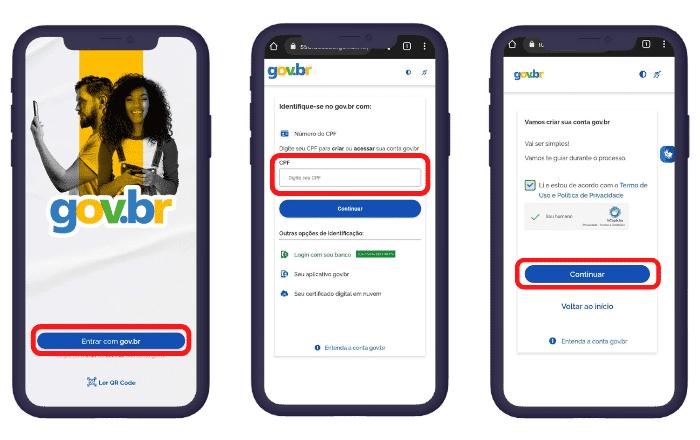
3️⃣ Confirm your identity: Depending on the account level, the system may ask for confirmation by:
- code sent by SMS
- facial validation
- confirmation of personal data
4️⃣ Access the digital wallet environment: After entering the system, look for the “ optionDigital Work Portfolio“. There you will already be able to view your professional records.
📱 If you prefer, you can also do all this directly through the application. We teach you here!
Who needs to make or activate the digital wallet
Not everyone needs to “emitir” the digital wallet from scratch.In many cases, the document is already active in the system.
Usually need to access or activate the digital wallet people who:
will begin the first job
they never accessed the digital wallet
they only used the physical wallet
they want to consult professional records
they need to track information sent by companies
Even those who have an old work card can access the digital version without losing the previous records.

What data appears in the digital wallet
After activating the access, you will be able to view various information related to your professional life.
Among the main data available are:
📄 Employment contracts
📄 Date of admission and termination
registered post
salary reported by the company
📄 History of professional ties
📄 Contractual changes
This information is sent by companies to the government system and is automatically registered in the digital wallet environment.
Documents needed to access your digital wallet
One of the advantages of the digital version is that it requires few documents.
Usually you will only need:
- CPF
- access to the account of portal Gov.br
- a cell phone or computer with internet
If the data reported is correct in the government system, access happens quickly.
What to do after activating your digital wallet
After entering the platform for the first time, it is worth doing some important checks. Check out if:
✔ your personal data is correct
your professional history appears correctly
old contracts were recorded
there are no unknown links
This conference helps you avoid future problems, especially when you need to prove work experience or access labor benefits.
⚠️ If any record does not appear correctly, there is a specific process for querying and correcting information. You can see how to do this here!

Common problems when creating or accessing the digital wallet
Some difficulties may arise during the first access. The most common are:
difficulty to enter the account Gov.br
personal data not recognised
🔹 System validation error
incomplete professional history
In most situations, the problem is related to the account registration or updating of information sent by companies.
Activating the digital workbook is a simple process, but extremely important for those who want to follow their professional life in an organized way. With just a few minutes of access to the system, you can view contracts, check records made by employers and follow updates whenever necessary.
Keeping this access active makes it easier not only to query information, but also to verify data that can directly impact your professional trajectory.